One Editor After Another
You like modal editors? I love 'em... I LOVE 'EM.
Contents
Naysayer
Yup, I switched from Neovim to Helix. Are you surprised? I’ve been using Helix since
June 2025. It was one spring day last year, reorganizing my Neovim
config when I realized this just
wasn’t going to work long-term if I keep fiddling with it constantly for the
fuck of it instead of getting some real work done. For over a year I had been
satisfied with messing around with Lua configs to get my own editor the exact
way I wanted it. Then I realized the Copr repository I used to update Neovim on
my desktop stopped supporting the Fedora version I used and some nvim packages
suffered for it.1 Then I realized the version of Neovim on my Mac was
far behind because I was too lazy to run brew update, and at this point you
probably know how the story goes.
Naturally word of Helix started popping up in nvim-related discussions online. The excellent demo on the editor’s homepage and kind-of-Vim-but-not-really-though-still-intuitive key mappings got me interested. And yea it’s written in Rust. Not to mention it pretty much included all of the tools I installed manually in nvim out of the box (telescope-style fuzzy finder, pickers, git gutters, nice collection of themes). Maybe I was after sane “opinionated” defaults all this time, because my Helix config file is refreshingly sparse to where I don’t need to maintain a git repository, at least for now.
theme = "napsayer"

[editor]
line-number = "relative"
mouse = false

[editor.indent-guides]
render = true
character = "▏"
skip-levels = 1
That’s my config.toml in its entirety. The font is handled by my terminal. Isn’t this better
than having to clone some random’s Git repository for some sane defaults or even a working treesitter?
Buffers
I used to use a tab-bar like thing in Neovim to manage buffers as if
it were some sort of weird web browser, but Helix has a buffer picker with
<space>b, and you can goto next/previous with gn and gp respectively,
close all other buffers with :bco, etc., so it’s all great having this all built
in. All’s well so far, and I haven’t missed much from Neovim.
Colors
The napsayer theme is my custom colorscheme adapted from a built-in
Helix theme called
naysayer,
which itself is a port of Jon Blow’s Emacs colorscheme.
inherits = "naysayer"

"ui.cursor.primary" = { bg = "#E3FFEE", modifiers = ["slow_blink"] }
"ui.cursor.match" = { bg = "cyan", modifiers = ["slow_blink"] }
"ui.cursor" = { bg = "#777777", modifiers = ["slow_blink"] }
"ui.statusline.inactive" = { fg = "text", bg = "#31504f" }
"warning" = { fg = "warning" }
"error" = { fg = "warning" }
"hint" = { fg = "violet" }

[palette]
bg = "#131c26"
text = "#56c49e"
line-fg = "#2d615f"
comments = "#61c850"
strings = "#64ca88"
warning = "#fb4934"
I just wanted it slightly more minty-green, hence the name. If you know you know. Everything else is
inherited from the
original naysayer theme and whatever updates it gets, so that’s nice. I don’t even
mind the default purple scheme that Helix starts with, I just like customizing things.2
The Keys That Bind
If you have heard of Helix before this post, you may be aware that it takes
its keymap from Kakoune instead of Vim. Now the
“verb-noun” grammar in Vim becomes “noun-verb” in Helix; basically selecting
before acting in Helix instead of acting then selecting in Vim. That may not
make much sense, but to delete a word in Vim, you may know that it’s just
dw, or “delete this selected word”. In Helix/Kakoune, it’s wd, or “select
this word, then delete it”. In some strange way they both make sense to me,
but when saying it out loud, Helix just makes more sense with the “steps” more
immediately apparent.3
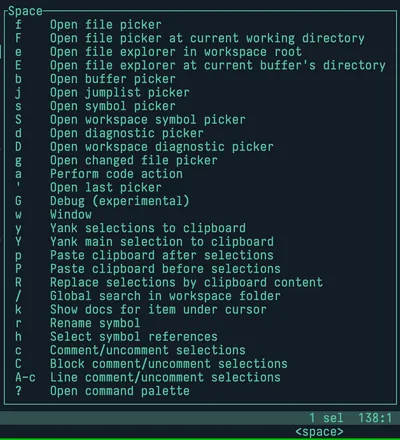
What also made Helix easier to migrate to was that pressing a mode button also showed a popup in the bottom right listing all the available keybinds. It’s insanely helpful and something that I wish Vim and Vim-likes had out of the box.
Funnily enough when I still need to use vim on a remote SSH connection or something, I usually have no problem going back to the old vim style logic of key ordering, so maybe that’s a good thing.
Searching
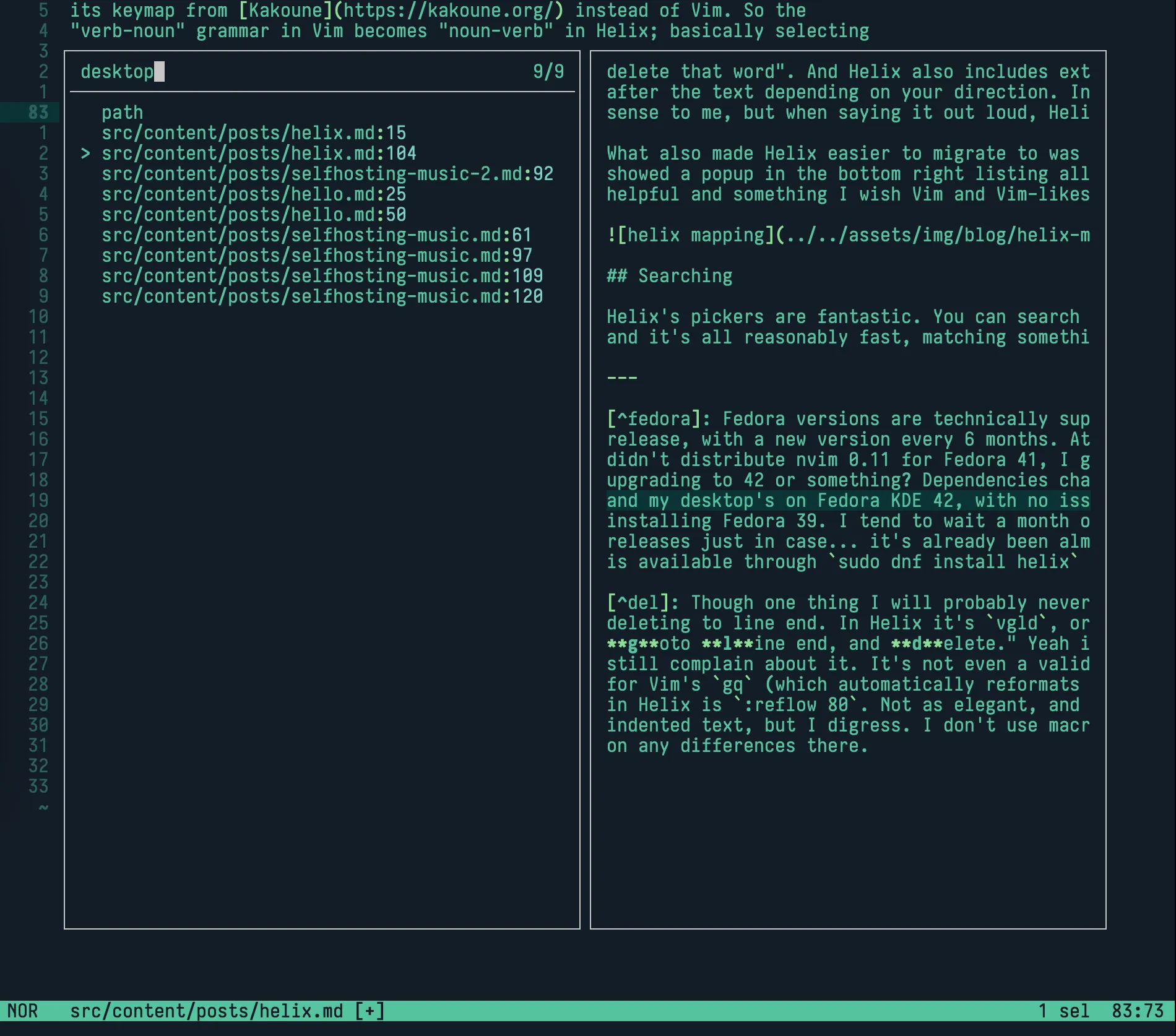
Helix’s pickers are fantastic. You can search filenames, contents in files,
names of buffers, optionally use regex, and it’s all pretty fast, matching
something like telescope
in nvim. I don’t have much else to say other than it’s great and you should give
it a shot if you’ve ever used telescope or ripgrep. Something I usually do now
to keep myself on track is to press <space>/TODO to just grab all the TODO
comments in the workspace and show them in a picker, and it’s so quick and easy
I couldn’t really imagine doing it any other way at this point. No need for an
extra extension or plugin or package or whatever.
Actual productivity
“Why don’t you work on Idlenet in an IDE instead of dealing with this shit?” Why not? VSCode is already turning into the Copilot-powered open-source IDE that everyone is definitely asking for, you still have to deal with extensions from different sources depending on where you got your VSCode flavor from (be it Codium or any of those AI sloppa forks), so to me it’s not really that far off from something based on nvim. Let’s not even get started on how much more I prefer Helix, Vim, and even Emacs’ keybinds over the mess of shortcuts (that end up usually being based on context) that VSCode provides. I don’t use Windows, and so the flexibility of editing anything light to heavy in a fast terminal application just appealed to me more than conforming to bad habits that I’d accumulated over the years of having used VSCode years ago. To this day my lazy ass is still tempted to use that Git source control GUI it has over entering the same git commands over and over again, but the friction of having to deal with everything else in that editor makes it even less appealing to me as time goes on.4
Admittedly the “work” I do isn’t all that complex and doesn’t require much besides being able to edit the text and run the changes so maybe I’m just screaming at a wall and you the reader will equate this to some dork comparing two brands of gel pen in anticipation of making the most beautiful and organized notes and agendas this year. Such a strawman shares the same qualities of those with the Neovim enjoyer, who loves organizing their setup and load order and optimizing the packages and settings they use to a T, putting in more time into the means than the end itself, now looking for things to improve in their setup after having just improved it, a never ending cycle of pursuit of the perfect, ideal, most productive setup. There will always be a new package to try, a new brand of paper, a new set of pens, new e-ink displays, new editing paradigms, new shortcuts to learn, plugins to install, new issues to track.
“you bite your lip and toss the piece out of the octet… which actually probably means that it turns out you do have standards, maybe not Olympian ones but standards and convictions just the same, which no matter how big a time-wasting fiasco the whole octet’s become ought to be a source of at least some small comfort.”5
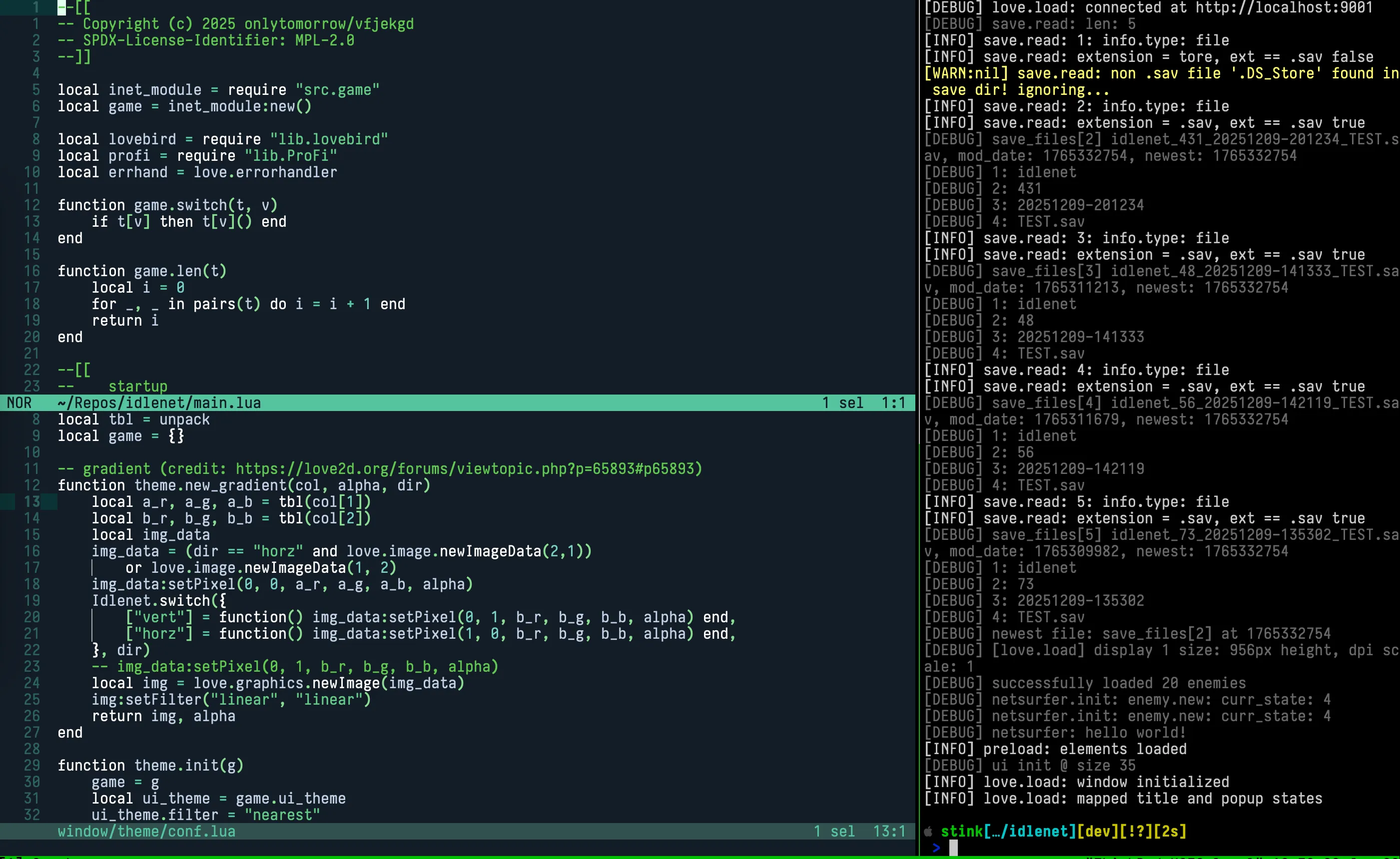
Anyways my usual “workflow” for Idlenet is having 2/3 of the screen be Helix and the other 1/3 to be a terminal window for running the game and reading output. Sure I miss having a built-in debugger with breakpoints and everything in VSCode, but the Lua language server is already working out of the box with Helix and I should just git gud at writing working code from the get go instead of constant trial and error with breakpoints and print debugging.6
Debugging
To be honest it’s pretty rare at this point for me to create something so game-breaking it needs to be debugged with breakpoints and stack traces; with how I’ve structured Idlenet it’s largely a bunch of smaller modules all working together with cursed dependency injection, so something breaking is mostly self-contained or a really simple fix. Adding/removing features is pretty flexible (at least to me) and there’s hardly any dealbreaking coupling going on or anything like that. Actually I still do print debugging you’ll never take that away from me.
It’s nothing special or mindblowing so here’s a screenshot of some potentially bad spaghetti code and game output from my Macbook as I’m writing this. Before you ask yourself, no, the two depicted window splits in Helix aren’t really related to each other, I just didn’t want to show the actual spaghetti code that lies in my repo.7
Helix, lua-language-server, and the terminal app usually use 30 MB, 200 MB, and 30-120 MB of
RAM respectively, with the latter varying (Ghostty at ~120 MB on Mac,
foot at ~30 MB on Linux). I’d say that’s far
better than the almost 2 GB of RAM Codium used to take up with extensions and
all on both systems. And Helix is faster. Editing this doc in Helix is just as
painless and the Markdown language server marksman uses even less resources
than Lua’s. Also tmux barely uses a couple MB of ram per session so I don’t even
take that into account. This is purely subjective and based on my own hardware
so take it with a grain of salt obviously.
It also probably goes without saying, but I like to believe I am actually
faster at navigating my workspace and file contents if I never
had to reach for the mouse.8 Especially with having Helix mappings to
move around files and using Ctrl-b % and Ctrl-b o to switch between game and
code splits in tmux, I rarely have to touch the mouse other than for testing out
the game.
I could even stop using tmux and just stick with Ghostty’s native window splits or Konsole’s own splits but I like the consistency in keybinds between Mac and Linux and the ability to detach from my workspace whenever I want when I should be doing something else. Years ago, for a while I really did use a Vim mode extension for VS Code, but I figured I might as well go with the real thing if I’m already going through all of that trouble to learn it. I think it was worth it.
Addendum for the addendum
Wakatime
Helix does not support Wakatime tracking out of the box, because
there is no stable plugin system (yet). A workaround I’ve begrudgingly
used is an implementation of Wakatime as a language server,
wakatime-ls, that optionally runs
alongside actual LSPs in Helix. Setup is pretty painless if you already have
wakatime-cli installed and in $PATH. It’s not pretty, but it’s worth it if
I can see my numbers go up and overtake Neovim, and I hope I don’t need to use
this once the plugin system is actually stable.
Further reading
Check out these other blog posts about switching to Helix that cover stuff that I’m not fully settled in with yet, like multiple cursors and more deeper configuration:
- https://felix-knorr.net/posts/2025-03-16-helix-review.html
- https://herecomesthemoon.net/2025/06/i-like-helix/ (this was the one that convinced me to switch)
- https://jonathan-frere.com/posts/helix/
- https://jvns.ca/blog/2025/10/10/notes-on-switching-to-helix-from-vim/
Someone in a comment I read said that if anyone was “Vimcurious”, that they should try out Helix. That’s a pretty silly way to put it but I agree.
Footnotes
-
This was 100% a skill issue on my end and would’ve been resolved if I bothered to update Fedora and some other repos in a timely manner. ↩
-
Some great built-in themes that aren’t
defaultornaysayerthat I’d recommend areearl_grey,gruvbox,meliora, the classicmonokai,poimandres, andrasmus. ↩ -
Something I will probably never get over is
Din Vim for deleting to line end. In Helix it’svgld, or “visual select mode, goto line end, and delete.” Yeah it makes more sense but I’ll still complain about it. It’s not even a valid complaint. Also the equivalent for Vim’sgq(which automatically reformats selected lines to <80 chars wide) in Helix is:reflow <chars>, or just:reflowfor 80 characters. Not as elegant, and sometimes doesn’t work well with indented text, but I digress. I don’t use macros or marks (yet) so I cannot comment on any differences there. ↩ -
Sometimes I really am lazy and use lazygit. On weeks where I forget to commit in chunks I hop on over to lazygit and sort it out there instead of ever opening VSCode and reconfiguring whatever Git bullshit it does on its own before chunking commits and pushing to several remote repositories. ↩
-
David Foster Wallace, “Octet” ↩
-
Thankfully, LÖVE and Lua make it almost as easy to prototype stuff as it was when I used to use GameMaker Studio, for better or for worse. I like to think I’ve implemented enough bespoke safeguards in my codebase where I can get away with this without catastrophic consequences. ↩
-
Once I inevitably publish the source code I hope that I can call this an overreaction. ↩
-
I still gotta use a mouse for playing the game, but let’s not count that. Imagine it like me developing a console game and reaching over for the controller when I need to start testing, the mouse is purely for having fun in this context. On a completely unrelated note, I tend to break my mouse’s scroll wheel usually within two years of first using it. Those in the graveyard include a Logitech G203, Razer Viper Mini, Delux M800, Razer Viper Ultimate, and, soon to join them, a Lamzu Maya (showing its first signs of scroll skips, woohoo!) I think it’s the constant use of middle-click for browser tabs, continuous scroll, and pick block in Minecraft that always does it. And I tend to press on the wheel pretty hard, much more than required, and it’s a hard habit for me to break. And now middle-click ping in Deadlock isn’t doing it any favors. Basically it’s probably better if I don’t need to rely on the scroll wheel for viewing my code;
Ctrl-d,Ctrl-u,gg,ge,zz, and line-based navigation are better for me anyways with shit like20jor30kbeing ingrained in muscle memory already. ↩


